

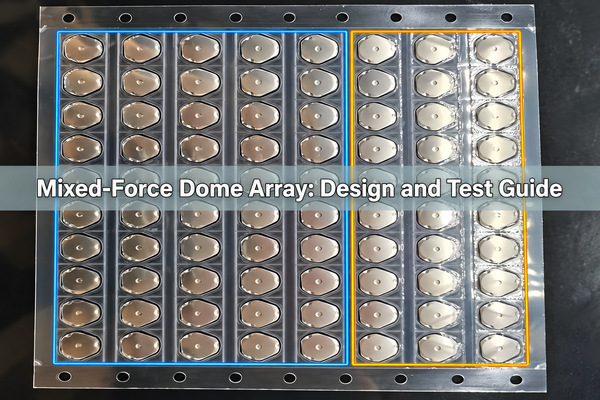
A mixed-force dome array places metal domes with different specified actuation forces at different key positions on one carrier. It is useful when a keypad needs a deliberate difference between frequently used controls and a key that should resist accidental presses. The force difference must be defined by position and checked in the assembled keypad; a different-looking dome is not proof of a different force.
What Is a Mixed-Force Dome Array?
It is a single adhesive-backed dome sheet populated according to a position-specific bill of materials. One location can use a lighter trip-force dome while another uses a firmer dome. The carrier holds each part in its assigned location for placement onto a PCB or membrane circuit. Our custom dome array product supports different dome sizes, shapes and forces on one array, subject to the drawing and prototype review.
“Mixed force” describes different keys on the same sheet. It does not mean two domes stacked at one key, or a two-stage switch with two electrical actions. Those are different constructions and should not be substituted in a quotation.
When Does a Keypad Need Different Dome Forces?
Use a force difference only when it serves a functional distinction that a label or key spacing cannot provide. A handheld controller, for example, may need a frequently used navigation key to feel lighter than a recessed reset key. An industrial keypad may use a firmer confirmation key to reduce an unintended press. If every key performs the same routine action, a uniform-force array is simpler to specify, source and inspect.
Do not assign a high force merely because a function is critical. A small keycap, a gloved operator or limited finger reach can make the assembled control harder to use than the isolated dome specification suggests. Evaluate the actual interface with its intended users and enclosure.
How Do You Assign Force by Key Position?
Start with the PCB drawing and label every switch location with a stable key ID. Then group positions by desired interaction, not by visual order on the sheet. The table below is a planning example, not a set of recommended force values.
| Key position | Intended behavior | Dome selection input | Prototype acceptance check |
|---|---|---|---|
| K1-K4, routine controls | Easy repeated operation | Candidate light-force part number and tolerance | Compare assembled key force and return behavior across all four positions |
| K5, confirmation | More deliberate actuation | Candidate firm-force part number and tolerance | Confirm the difference remains perceptible with the final keycap |
| K6, recessed service key | Resistance to accidental press | Candidate part plus recess and actuator geometry | Verify intended access without bottoming the dome or enclosure |
On the drawing, put the dome part number or approved force class beside each key ID. A color-coded mockup can help communication, but the released drawing and bill of materials must carry the actual mapping. The mixed-force dome array should not rely on color alone to distinguish otherwise similar parts during assembly.
What Should a Dome Force Specification Include?
For each key, state the trip-force target and permitted tolerance, the method and fixture used to measure it, the actuation point, and whether the requirement applies to the bare dome or to the assembled key. Include travel and return-force requirements if they matter to the user experience. A nominal force without test conditions can be interpreted differently by two suppliers.
Use one unit consistently, such as gf or N, and specify whether the quoted number is a target or an acceptance limit. When reviewing a candidate, ask for its actual force-travel curve rather than assuming that two domes with the same peak force have the same tactile feel. A minimum separation between force groups should be agreed from assembled samples and production tolerances, not guessed from two nominal values.
How Do Dome Shape and Size Affect Selection?
Round, four-leg and oblong domes have different footprints and contact requirements. Shape can help fit a narrow key area or a given PCB pad pattern, but it does not by itself determine the trip force. Two visually similar domes may have different force specifications; two visibly different domes can have overlapping force ranges.
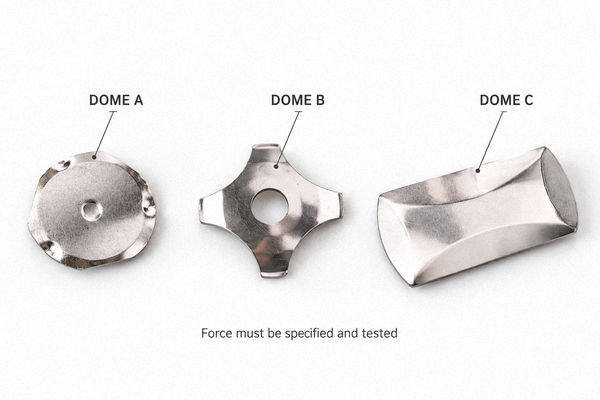
If an existing footprint constrains the design, first check compatible custom metal dome options against its pad geometry. Changing a key from round to four-leg solely to make it feel firmer may require a new contact pattern, carrier aperture and actuator check. Treat that as a layout change, not a part-number swap.
Why Can Assembled Key Force Differ from Dome Force?
The user pushes a keycap or overlay, not the bare metal dome. The finger force includes the stiffness of the keycap, rubber or overlay, the actuator contact point, pre-travel, any preload, and friction or deflection in the enclosure. An off-center actuator may tilt a dome, increase required force or degrade return behavior. Therefore, a bare-dome force certificate alone cannot prove the finished keypad meets a per-key feel target.
Agree on two measurements when the distinction matters: incoming dome force measured in a specified fixture, and finished-key force measured at a defined point on the production-like assembly. Keep the force groups distinct at the finished-key level.
How Do Carrier, Spacer and Actuator Affect Feel?
The adhesive carrier positions the domes, but carrier film, spacer openings and overlay thickness also change the path from finger to dome. A spacer that is too thick can demand excess travel; insufficient clearance can preload a dome before the user touches the key. Either condition can erase the intended contrast between light and firm positions.
Where a keycap does not press near the dome center, an actuator feature may improve contact alignment. We offer plunger-actuator dome arrays, but a plunger is an assembly feature, not a universal fix for a wrong dome-force specification. Confirm height, lateral position and travel on prototypes using the actual enclosure stack.
How Should the PCB Pad and Dome Layout Be Checked?
Every dome location needs a compatible center contact, outer support contact and clearance for its chosen shape. A different dome diameter or leg pattern can change the pad design even if its center remains at the same key coordinate. Check carrier registration features, PCB outline, adhesive keep-outs and any venting path together on the drawing.
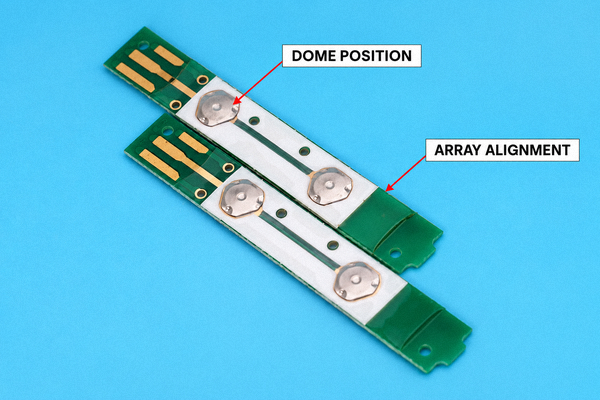
For mixed-force sheets, add a location ID to the inspection drawing so a dome installed in the wrong position is detectable before the array is applied. A visual check of the transparent carrier can catch a shape or size error, but similar-looking domes require part traceability or force testing; appearance alone is not a force inspection method.
How Do You Prototype and Test Each Force Zone?
Build a small lot with the intended PCB, carrier, keycaps or overlay and enclosure. Test every key ID, not just one representative dome from each force group. Use the same actuator tip, speed, contact point and temperature when comparing curves. Record peak actuation force, travel, electrical closure point and release behavior for both bare domes and assembled keys where specified.
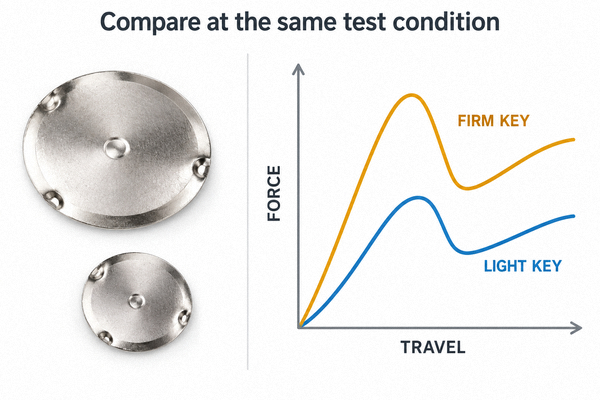
The curves shown are conceptual, not measured results. On real samples, compare the distributions rather than a single best example. If the light group’s upper results overlap the firm group’s lower results after assembly, the chosen nominal difference may not be robust enough. Check edge and corner positions as well as central keys, because carrier and enclosure support can vary across a panel.
What Failures Signal the Wrong Force Mapping?
| Symptom on the finished keypad | Likely checks | Practical correction |
|---|---|---|
| “Firm” key feels the same as routine keys | Confirm position map, part IDs and assembled force curves | Correct the part assignment or increase the validated separation between groups |
| One key clicks but does not register | Check actuator centering, dome seating and PCB contact pattern | Correct alignment or pad geometry before changing force |
| Light key activates during assembly or transport | Check preload, spacer height and keycap interference | Remove unintended preload; then reassess the force target |
| Key feel varies within one force group | Compare carrier thickness, enclosure support, placement and lot curves | Control the stack and define a finished-key acceptance range |
Do not treat a tactile click as proof of electrical closure. Check both the force curve and the switching event, particularly when the enclosure limits travel.
What Should You Send for a Mixed-Force Array Quote?
At EBest Circuit(Best Technology), we need a drawing that shows the overall carrier outline, PCB pad pattern, all key coordinates, cutouts and alignment features to review a mixed-force array quote. Attach a key-position table with the intended dome part number or force target and tolerance for every location. Include the stack-up, actuator or keycap dimensions, desired travel, operating environment, annual quantity and proposed acceptance test.
If no dome part numbers have been selected, send the intended light/firm key functions and a production-like sample or CAD stack-up. We can review candidate options against the drawing, but final force groups should be approved on assembled prototypes. The mixed-force dome array specification should identify the revision of both the force map and PCB drawing so the same quotation cannot be applied to a changed layout.
FAQ
Can different forces be placed on one dome array?
Yes. Different metal dome forces can be assigned to different locations on a custom carrier. The drawing must identify each position and its approved dome specification.
Is a mixed-force array the same as a two-stage switch?
No. A mixed-force array differentiates separate key positions. A two-stage switch creates two actions at one key and needs a different electrical and mechanical design.
Can dome shape tell you which key is firmer?
No. Shape helps determine footprint and contact layout. Force must come from the part specification and verification test.
Should force be measured before or after the array is assembled?
Both may be useful. Bare-dome testing checks the incoming component; assembled-key testing checks what the user actually presses. State which measurement controls acceptance.
Can a stronger dome fix accidental presses?
It may help, but first check keycap preload, enclosure clearance, recess and activation travel. A geometry error can cause accidental operation even with a firmer dome.
A useful mixed-force design has a clear function for each force group, a released position map and a test method that preserves the difference in the finished keypad. Send us your drawing and key-force targets at sales@metal-domes.com; we can review them for design and quotation.