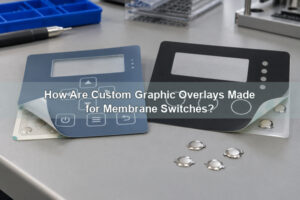

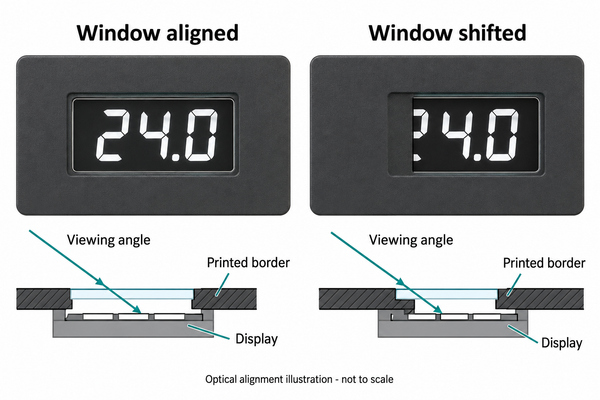
Control panel overlays identify buttons, frame displays and protect the printed information on an equipment face. A successful overlay must fit the enclosure and the controls underneath it: a shifted window can hide a reading, an incorrect cutout can obstruct a selector, and an overly stiff key area can change the force needed to operate a switch.

At EBest Circuit(Best Technology), we manufacture custom graphic overlays and membrane switch assemblies with metal dome arrays. We can coordinate the printed face with the key positions, display openings and adhesive pattern, rather than treating the artwork as a separate sticker. For a new panel or a replacement, the starting point is the actual mechanical layout and operating environment.

What Is a Control Panel Overlay?
A control panel overlay is the printed face layer placed over a panel or switch assembly. It carries legends, symbols, colors and operating zones. Depending on the design, it may include clear windows, translucent indicators, embossed keys and physical openings. It is not necessarily the part that makes the electrical contact.
The distinction matters when ordering. A graphic overlay alone cannot replace a damaged membrane circuit, and a complete membrane switch is not required when only a separate, serviceable printed face needs replacement. Control panel graphic overlays can also surround independent pushbuttons or rotary controls without becoming part of those switches.
| Part | Main job | What to specify |
|---|---|---|
| Graphic overlay | Identify functions and provide the visible face | Artwork, film, finish, windows and cutouts |
| Membrane switch assembly | Convert a press into an electrical input | Circuit, connector, key positions and tactile construction |
| Rigid front panel or housing | Support and locate the interface | Recess, openings, mounting geometry and surface finish |
How Do You Design a Control Panel Overlay?
Begin with the controls and display, then build the artwork around their fixed positions. For custom control panel overlays, a visually balanced drawing is not enough if the key legends do not match the electrical functions or the window does not match the active display area.
Use a controlled drawing to separate the overall outline, physical cutouts, printed areas, transparent zones and adhesive pattern. Give each feature its own layer or unambiguous notation. Include a common datum so the overlay, enclosure and electronics can be checked against the same reference instead of measuring each from a different edge.
Keep legends readable in the intended working position. A panel used with gloves needs appropriate key spacing; a panel read from above needs its display checked at that viewing angle. Mark the artwork revision and check every START, STOP, direction and unit against the actual equipment function before releasing the file.
How Should Cutouts and Key Positions Be Aligned?
Locate cutouts and key centers from shared mechanical references, and account for the variation of every mating part. Printing accuracy alone cannot compensate for an enclosure opening or switch assembly that is offset.
For a rotary control, distinguish the shaft opening from the bezel footprint and tool clearance. For a cable tail, identify the route and bend space rather than drawing a hole solely from the flat cable width. For membrane keys, align the printed press zone with the intended actuator and contact position; do not use the artwork edge as an uncontrolled assembly reference.
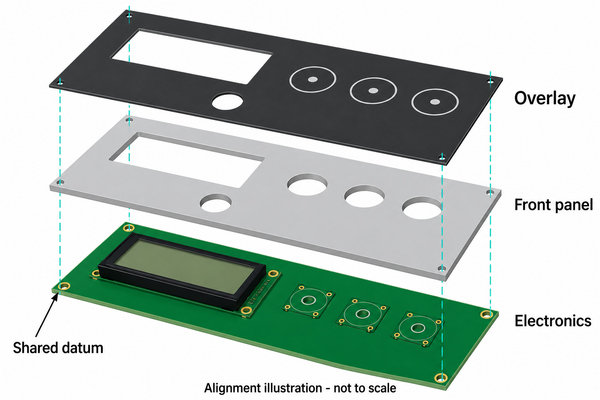
We can position keys and define the carrier outline through our custom dome arrays. Send the overlay and circuit drawings together so the dome centers, adhesive openings and housing features can be evaluated as one assembly. There is no universal clearance value: the required allowance depends on component size, locating method and the combined dimensional tolerances.
Should a Display Window Be Clear, Tinted or Open?
A clear or tinted window retains the overlay film over the display; an open window removes it. These constructions have different optical and sealing consequences and must be identified separately on the drawing.
| Window type | Useful purpose | Check on the assembled panel |
|---|---|---|
| Clear film window | View a display while retaining a continuous film face | Haze, scratches, reflections and the visible display area |
| Tinted or dead-front window | Conceal an inactive indicator or improve the desired off-state appearance | Readability when lit, daylight visibility and color shift |
| Physical cutout | Leave an independent display or control exposed | Bezel fit, edge clearance and the separate seal |
Do not size the visible window from the display module’s outside dimensions alone. Include its active area, placement variation, viewing angle and any shadow from the printed border. A transparent film can still reduce visibility through surface texture or glare. Keep adhesive out of the optical area unless an appropriate optical bonding construction has been specified and validated.
For illuminated legends, the printed light-transmitting zones must also match the light source. Our LGF dome arrays combine a light-guide-film approach with tactile keys. They support a backlit interface design, but the final appearance still depends on the LED arrangement, printed mask and complete stack. A display window and a backlit key should not receive the same optical specification by default.
How Does an Overlay Affect Button Feel?
The film above a key adds mechanical resistance, so a dome’s individual operating force is not the same as the force felt at the finished panel. Film thickness, embossed shape, adhesive openings, actuator contact and available travel all contribute.
Our membrane-switch graphic constructions use thin polyester or polycarbonate films, commonly up to 0.25 mm for the graphic layer. That is a construction reference, not a thickness requirement for every panel. A rigid decorative face around separate buttons serves a different purpose from a flexible area repeatedly pressed over a dome.
Check the key at its center and at realistic off-center finger positions. The overlay should not hold the switch partly depressed, suppress release or rub against a surrounding bezel. For an early single-key sample, single-key dome arrays can help evaluate a candidate local stack. A complete multi-key assembly is still needed to confirm the interaction of the final carrier, adhesive and housing.
Which Surface Finish Keeps Panel Legends Readable?
Choose the finish for the way the equipment will be read, touched and cleaned. Matte texture can reduce distracting reflections, while a display window may need a smoother optical area. The useful choice is often selective texture rather than one finish over the entire face.
Control panel overlay printing can place the graphics behind a transparent film to protect the ink from direct rubbing. However, reverse printing does not make the exposed film immune to scratches or chemicals. Specify the actual cleaner, concentration, contact time and wiping method when assessing durability. Polyester and polycarbonate grades, coatings and inks must be considered together rather than assuming a material name guarantees resistance.
For outdoor equipment, include UV exposure and temperature conditions. For regularly cleaned equipment, inspect both legend readability and the edge bond after the agreed exposure. Do not change a warning color or operating symbol simply to match a new decorative theme.
Why Do Overlay Edges Lift After Installation?
Edge lift occurs when the adhesive bond cannot resist the stresses at the edge. Contamination, an unsuitable adhesive, a rough or low-surface-energy substrate, inadequate application pressure and a tight bend can all contribute. Changing to a stronger-looking tape without checking the cause can leave the same failure in place.
The mating surface may be painted metal, molded plastic or another film, and each presents a different bonding condition. Identify the actual surface finish, including paint or powder coat, rather than naming only the material underneath. Confirm the adhesive’s application temperature and required time before handling or exposure.
| Observation | Checks before changing the design |
|---|---|
| One corner lifts first | Corner geometry, handling damage, local contamination and pressure |
| Many edges lift on one housing batch | Surface finish variation, release residue and cleaning compatibility |
| Bond fails after chemical cleaning | Cleaner exposure, edge penetration and adhesive compatibility |
| Bubbles appear after assembly | Trapped air, installation method and substrate outgassing |
Keep the overlay supported across the intended bonding area. Adhesive should not bridge an opening that needs to remain free, cover an optical window unintentionally or interfere with the movement of a key. The adhesive pattern belongs on the drawing alongside the visible graphics.
How Do You Install a Control Panel Overlay?
Align the overlay before exposing the entire adhesive surface, then bond it progressively to avoid trapped air and misplaced features. Follow the approved adhesive and equipment instructions; installation pressure and dwell conditions are not interchangeable between materials.
- Isolate the equipment safely and protect exposed electronics from cleaning fluids and debris.
- Check the part number, drawing revision, legends, cutouts and display orientation against the equipment.
- Prepare the mating surface using an approved, compatible cleaning method and allow it to dry.
- Dry-fit the overlay with its liner in place. Confirm the datum, window and key positions.
- Expose a small liner section, locate the first edge or assembly reference, and peel the liner progressively while applying even pressure to supported areas.
- Observe the adhesive’s specified dwell conditions before service. Check the display and every control after assembly.
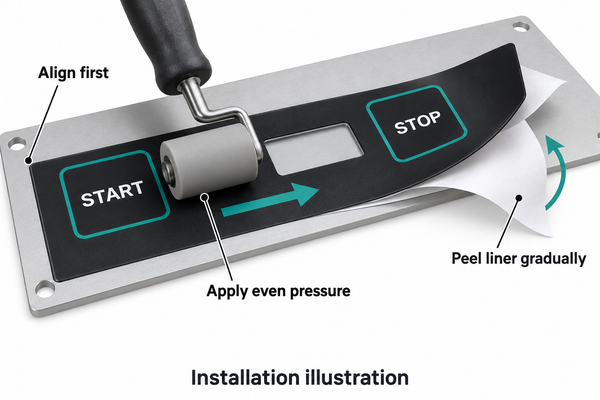
Do not press hard over an unsupported display or repeatedly lift a permanent adhesive to correct alignment. For recurring builds, locating features or a simple fixture can make positioning more consistent than visual alignment alone.
Can You Replace an Overlay Without Replacing the Keypad?
Yes, when the overlay is a separately replaceable face and the electrical assembly remains sound. No, when removal would damage an inseparable membrane stack or when the underlying circuit, dome or connector is already faulty. Diagnose unresponsive keys before deciding that new graphics will solve the problem.
Replacement control panel overlays need more than a photograph of the front. Supply the equipment revision, overall dimensions, opening positions, old-part sample if available, mounting surface and required legends. An old overlay may have stretched or shrunk, so compare it with the housing and original drawing rather than tracing it uncritically.
Avoid applying a second overlay over a worn first layer unless that construction has been evaluated. Added thickness can alter button travel, window alignment and edge bonding. Brand-specific appliance and hot-tub repairs also require the correct equipment documentation; a matching color scheme is not evidence of mechanical or electrical compatibility.
What Should You Send for a Custom Overlay Quote?
Send the mechanical drawing and artwork with the intended assembly details. For custom control panel overlays, we need to know whether we are supplying the graphic face alone or a complete membrane switch with tactile keys, circuitry and illumination.
- Overall dimensions, datum references, tolerances, cutouts and key-center coordinates.
- Editable artwork, required colors, legends, finish and window definitions.
- Housing material and surface finish, adhesive restrictions and installation method.
- Operating temperature, sunlight, cleaning chemicals and any required assembly-level tests.
- Prototype quantity, production quantity, revision requirements and the existing sample where relevant.
We can develop the printed overlay together with the dome array and membrane switch structure. Send your drawings and application details to sales@metal-domes.com for an engineering review and quotation. The final specification should identify the supplied assembly, not leave the circuit, adhesive or installation responsibility implicit.
Control Panel Overlay FAQs
Can I order control panel overlays online from artwork alone?
Artwork is useful for an initial review, but production also requires the mechanical dimensions, material construction and mating-surface information. A scale setting or a PDF border is not a substitute for a dimensioned drawing.
Can a downloaded template be used for a production overlay?
A template can help arrange graphics, but it does not establish the equipment’s dimensions, switch locations or material requirements. Measure and verify the actual interface before using a downloaded design for manufacturing.
Are arcade control panel overlays the same as industrial membrane overlays?
They share a printed face function, but an arcade overlay often surrounds separate joystick and pushbutton openings. A membrane overlay may need to flex directly over tactile keys. The mounting layout and actuation construction, not the graphic style, determine whether a design can transfer between them.
Does a continuous overlay make a control panel waterproof?
No. Openings, panel edges, cable exits, seals and the enclosure all affect liquid ingress. The assembled equipment must meet its specified protection requirement; a continuous film alone does not establish an IP rating.
Well-fitted control panel overlays keep the legends, windows and controls in the right relationship. Confirm those features on an assembled sample before releasing the production revision.