
PCB mounting holes secure a circuit board to an enclosure, bracket or support. In a metal dome switch, however, they also influence PCB flatness, dome-array alignment, actuator clearance, vent continuity and the load transferred through the keypad stack. A hole that fits the screw can still cause unreliable tactile response if the tightened assembly bends the PCB or shifts the dome centers away from the contact pads.

What Are PCB Mounting Holes?
PCB mounting holes are mechanical features used with screws, standoffs, rivets, locating bosses or other PCB mounting methods. They belong to the finished product assembly, so their diameter, plating, pad, clearance and position must be defined from the actual hardware and enclosure rather than copied from an unrelated board.

A mounting hole may be a non-plated through hole (NPTH) that provides mechanical clearance, or a plated through hole (PTH) with an exposed or solder-mask-defined pad. Plating does not automatically make the joint stronger or safer; it creates an electrical interface that must have a deliberate net and chassis strategy.
PCB Mounting Holes vs Tooling Holes
Mounting holes stay with the finished PCB, while tooling holes support fabrication, panel handling or assembly equipment. A tooling hole is commonly placed in a production panel or breakaway rail and removed after depanelization. A mounting hole remains on the individual board and must match the enclosure hardware.
| Feature | PCB mounting hole | Tooling hole |
|---|---|---|
| Primary purpose | Secure the finished board or provide a defined chassis connection | Locate or hold a panel during fabrication and assembly |
| Final location | On the finished PCB | Often on panel rails or temporary tabs |
| Plating | PTH or NPTH according to electrical intent | Normally NPTH unless a specific process requires otherwise |
| Reference | Enclosure, standoff and keypad datum | Fabricator or assembler tooling datum |
Do not use a panel tooling hole as the only reference for a dome array unless the final PCB retains that feature and the entire coordinate system is controlled. The datum used to place the domes must still exist after the board is separated from the panel.
Should PCB Mounting Holes Be Plated?
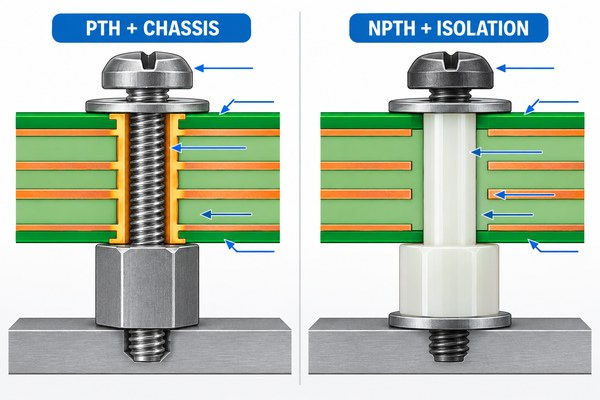
PCB mounting holes should be plated only when the assembly needs a conductive connection or a plated mechanical interface. The practical answer to pcb mounting holes plated or not depends on the fastener, enclosure material, insulation requirement and grounding plan. Plated mounting holes should therefore be treated as defined electrical features, not as a default mechanical upgrade.
- Use an NPTH with adequate copper clearance when a plastic standoff or insulating shoulder washer must keep the fastener electrically isolated.
- Use a PTH when the screw and exposed pad are intended to contact chassis, protective earth or another defined ground network.
- Do not leave a plated pad electrically floating beside sensitive keypad traces. Give it an intentional net or change it to an isolated mechanical hole.
- Keep solder mask, copper, silkscreen and assembly notes consistent with the intended washer and screw-head contact area.
How Do You Select PCB Mounting Hole Size?
PCB mounting hole size starts with the maximum fastener envelope, not the nominal screw name alone. Add the clearance needed for coating or plating, hole tolerance, PCB-to-enclosure positional tolerance, insertion angle and the amount of float required during assembly. Then confirm the fabricator can hold the specified finished-hole size and tolerance.
| Input | Why it changes the finished hole | Drawing action |
|---|---|---|
| Fastener major diameter | Defines the minimum physical passage | Use the actual hardware drawing, not only an M-size label |
| PTH or NPTH | Plating changes the finished diameter and electrical function | State finished size and plating status explicitly |
| Hole-position tolerance | PCB and enclosure coordinates can shift in opposite directions | Apply a common datum and a calculated positional tolerance |
| Washer or screw-head diameter | Controls top-side keepout and exposed-pad diameter | Show the complete hardware envelope |
| Assembly float | Prevents all holes from over-constraining the board | Use clearance or a permitted slot when the stack requires it |
A PCB mounting hole size chart can be a hardware reference, but it cannot replace this tolerance calculation. There are no universal standard PCB mounting holes that fit every enclosure. Oversizing all holes creates board movement; undersizing them transfers alignment error into PCB stress and may preload the keypad.
Where Should PCB Mounting Holes Be Placed?
Place mounting holes where the enclosure can support the PCB without bending it through the active key field. Corner locations are common, but a long keypad may need additional support where pressing force would otherwise flex the board. Support points should react the user’s load through the housing, not through components or unsupported PCB spans.
Coordinate the mounting-hole pattern with board outline, connectors, tall components, cable exits and service access. At least one mechanical datum should locate the assembly; the remaining fasteners should secure it without creating an unnecessary four-way interference fit. If thermal expansion or a long tolerance chain is significant, one round locating feature plus a controlled slot or clearance feature can prevent stress while retaining orientation.
What Clearance Is Needed Around PCB Mounting Holes?
The keepout must cover the complete moving and contact envelope of the screw, driver, washer, standoff and housing boss. Copper clearance based only on the drilled hole is not enough because the hardware can rotate, tilt or scrape the board during assembly.
- Keep components and dome contact pads outside the screw-head and tool-access area.
- Define copper and trace clearance on every affected layer, including inner planes for NPTH isolation.
- Prevent solder mask ridges or labels from sitting under a washer that must clamp evenly.
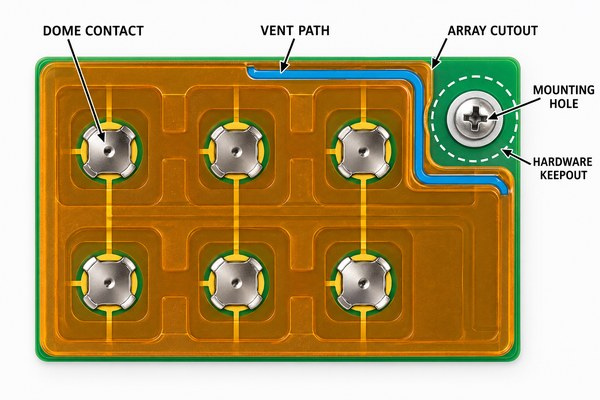
- Keep the adhesive carrier and spacer away from the hardware unless the cutout is intentionally captured and validated.
- Do not route a dome vent channel through an area that a washer, boss or compressed gasket can close.
Should PCB Mounting Holes Be Grounded?
PCB mounting holes should be grounded only when the electrical and mechanical design defines the connection. For PCB ground mounting holes, assign the intended chassis, protective-earth or circuit-ground net explicitly. A metal screw may connect a plated pad to a chassis, but the chassis, protective earth, signal ground and shield are not automatically the same node. The design must preserve safety isolation and avoid creating an unintended ground loop.
PCB mounting holes with vias can connect an exposed mounting pad to an internal ground or chassis plane and can distribute current around the pad. The via pattern is not a universal requirement, and it should not bridge an isolation boundary or encroach on the dome-contact keepout. For an EMI metal dome array, define separately how the printed shielding layer, PCB ground, mounting hardware and enclosure are connected; the mounting hole alone does not complete an ESD strategy.
How Do Mounting Holes Affect a Metal Dome Array?
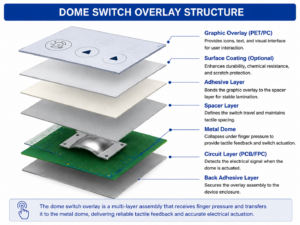
Mounting holes affect a dome array whenever the PET carrier, spacer, release liner or adhesive crosses the hardware area. A clean cutout is needed so that the screw and washer do not wrinkle the carrier, squeeze adhesive into a vent or pull the array away from the PCB contact pads.
For custom dome arrays, we can coordinate the array outline, mounting-hole cutouts, dome coordinates and PCB registration features from one controlled drawing. Keyboard PCB mounting holes are especially sensitive because a wide key field amplifies small skew and board bow across many keys.
How Can Mounting Screws Change Dome Feel?
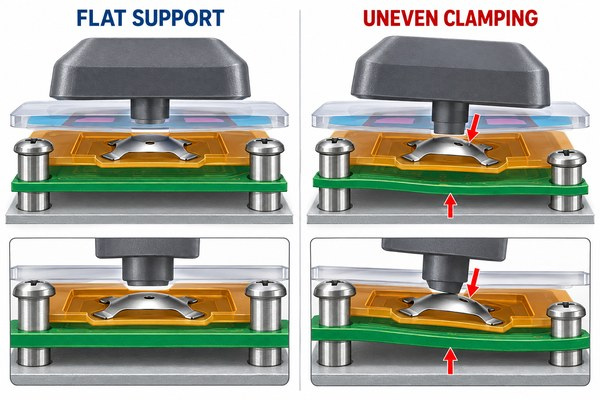
Mounting screws can change dome feel by bending the PCB or compressing the keypad stack unevenly. The dome’s force curve does not change in isolation, but the user’s required key force can change when PCB bow alters actuator clearance, creates continuous preload or prevents the dome from reaching its intended contact plane.
Do not validate tactile force on an unmounted PCB and assume the finished enclosure will match it. Tightening sequence, fastener torque, standoff height, gasket compression, overlay stiffness and support spacing all matter. A plunger dome array requires particular attention because the plunger height and actuator gap make stack compression directly visible at the key surface.
How Should Holes, Contacts and Actuators Be Aligned?
Use one shared coordinate system for mounting holes, PCB contact pads, dome centers, actuator centers and enclosure bosses. If these features are dimensioned from different edges, the individual tolerances can accumulate and move the actuator off the dome crown.
A mounting screw is not automatically a precision locator. Clearance holes permit movement until the board is clamped, while tight holes can over-constrain the board. Use dedicated locating pins, slots, edge features or a defined datum scheme when keypad alignment needs tighter control than the fastening clearance provides. The array itself should include registration features that are traceable to the same PCB datum.
What Should the PCB Drawing Specify?
The drawing should remove ambiguity about finished hole geometry and its assembly function. Include the following information:
- finished hole diameter or slot size, tolerance and quantity;
- PTH or NPTH designation, pad diameter, solder-mask opening and assigned net;
- position tolerance from the assembly datum and the mating enclosure coordinates;
- screw, washer, standoff and driver-access envelope;
- component, copper, dome, adhesive and vent-channel keepouts;
- array cutouts, registration features and dome-center coordinates;
- required isolation, chassis connection or ESD notes;
- fastener sequence, torque or gasket-compression limits when these are controlled by the product specification.
At EBest Circuit(Best Technology), we review the mounting-hole interface together with the metal dome or dome-array stack rather than treating it as a detached PCB feature. For an engineering review or quotation, send the PCB data, enclosure drawing, fastener and standoff specifications, dome/contact coordinates, actuator section, stack-up, sealing requirement, target force/travel, validation requirement and forecast quantity.
How Should the Assembled Keypad Be Tested?
Test the keypad after the PCB is mounted with production-intent hardware and stack compression. The acceptance sample should use the intended tightening sequence, supports, overlay or silicone keypad, array adhesive and enclosure parts.
| Check | What it can reveal | Compare across |
|---|---|---|
| PCB flatness and witness marks | Over-clamping, tilted standoffs or uneven washer contact | Loose, nominally tightened and fully assembled states |
| Key force and travel | Preload, actuator offset or local board flex | Keys near mounting holes versus center keys |
| Contact resistance and continuity | Incomplete collapse or shifted dome/contact alignment | Before and after mechanical cycling |
| Vent recovery | Blocked array channels or gasket compression over a vent | Single key and rapid multi-key actuation |
| Environmental retest | Movement after thermal cycling, vibration or humidity exposure | Initial assembly versus conditioned samples |
If a key near a mounting screw has a different force, sound or recovery time, inspect board flatness and local stack compression before changing the metal dome specification. The mounting interface may be the actual cause.
PCB Mounting Hole FAQs
Are standard PCB mounting holes available for every screw size?
No. Hardware tables provide starting clearances, but the finished hole must also include plating, hole tolerance, positional tolerance, coating and assembly float. Use the real fastener and enclosure drawings.
Can mounting holes locate a metal dome array?
They can participate in the datum scheme, but ordinary clearance holes do not provide precise location. Use controlled registration features when dome-to-contact or actuator-to-dome alignment is tighter than the screw clearance.
Can a grounded mounting hole replace a keypad ESD design?
No. It can provide one chassis or ground connection, but ESD performance also depends on the discharge path, enclosure, shielding layer, ground network, component protection and isolation boundaries.
Reliable PCB mounting holes fit the hardware without forcing the PCB, preserve the electrical grounding plan and keep the dome-array stack flat, aligned and ventilated after final tightening. Send the complete mechanical and keypad data to sales@metal-domes.com so we can review the mounting interface together with your custom metal dome array.