
A capacitive touch screen controller measures small changes in a touch sensor’s capacitance, identifies valid touches, and sends their coordinates to a host processor. The sensor detects interaction; the controller interprets it; the application decides what happens next. Matching the controller to the electrode pattern, cover glass, display noise and host interface matters more than choosing by screen size alone.
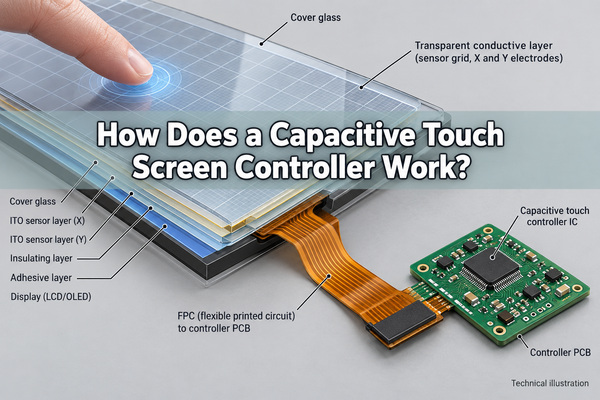
What Does a Capacitive Touch Screen Controller Do?
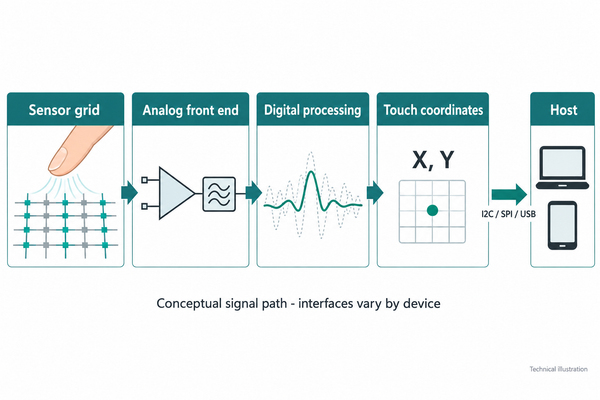
A capacitive touch screen controller IC converts measurements from transparent electrodes into usable touch information. Its analog circuitry acquires the sensor signals, while digital processing distinguishes touches from background variation. Depending on the device, its output can include position, contact identifiers, touch size and gesture information.
The controller is not necessarily the display driver. A display driver creates the image; a touchscreen controller detects input. Some integrated devices combine those functions, but a separate controller board cannot be assumed to drive LCD pixels just because it connects to the same module.
The distinction also matters when selecting a capacitive touch microcontroller. A device that measures several capacitive buttons may suit a small control panel without supporting the electrode count, scanning method or coordinate processing of a full projected capacitive touchscreen.
How Do Capacitive Touch Screens Work?
Capacitive touch screens work by detecting how a finger changes the electric field around sensing electrodes. A projected capacitive touch panel places these electrodes beneath an insulating cover. Pressure does not need to close an electrical contact.
In a typical controller signal path, an excitation signal is applied to the sensor, the analog front end measures the response, and the result is compared with a baseline. Filtering and touch classification then produce coordinates. The host translates those coordinates into a button press, slider movement or other application action.
Baseline tracking compensates for slow background changes, but it is not a remedy for an incompatible sensor. Excessive noise, incorrect channel mapping or an unsuitable cover stack can still cause missed touches or false detections. Successful operation on a bare development board does not establish performance after the final display and enclosure are fitted.
What Is the Difference Between Self and Mutual Capacitance?
Self-capacitance measures an electrode relative to its environment or reference. Mutual capacitance measures coupling between transmit and receive electrodes. A projected capacitive touch controller may use both techniques rather than relying exclusively on one.
| Sensing method | What is measured? | Practical distinction |
|---|---|---|
| Self-capacitance | Capacitance associated with an individual electrode | Can provide strong detection in some weak-coupling conditions; coordinate ambiguity depends on the electrode arrangement and processing |
| Mutual capacitance | Coupling at transmit/receive intersections | Provides spatial measurements that support distinguishing multiple contacts |
| Combined sensing | Information from both measurement methods | Allows device-specific classification of fingers, gloves or unwanted contacts |
For example, identifying two simultaneous touches requires more than detecting that two rows and two columns changed. The controller must associate the changes with the correct intersections. Multi-touch capability therefore depends on the sensing architecture and firmware, not simply the number of available input pins.
How Do You Match a Controller to a Touch Panel?
Start with the touch sensor drawing and electrical specification, not only its diagonal size. Two panels with the same visible dimensions can have different electrode counts, routing, capacitance and connector assignments.
| Item to confirm | Information needed | What can go wrong? |
|---|---|---|
| Sensor channels | Transmit/receive count, mapping and supported sensor topology | An apparently compatible connector may connect the wrong signals |
| Cover stack | Glass or plastic, thickness, adhesive and any air gap | Finger coupling can fall outside the validated range |
| Sensor loading | Electrode resistance and capacitance, including the flex tail | Acquisition may become noisy or unreliable |
| Power and I/O | Supply rails, logic levels, reset and interrupt requirements | Communication can fail even when the panel powers on |
| Mechanical assembly | Bezel, nearby metal, display and cable position | A tuned loose panel can behave differently in its housing |
| Software | Firmware configuration, driver and host support | Coordinates or wake behavior may not match the application |
Keep the sensor and controller configuration together during changes. Replacing the cover lens or extending the FPC can require new tuning and verification even if the capacitive touch panel controller and firmware version remain unchanged.
Should You Choose a Controller IC or a Controller Board?
Choose a capacitive touch screen controller chip when the design team can implement its circuit, sensor connection, configuration and host integration. Choose a capacitive touch screen controller board when a compatible assembled implementation reduces that integration work. Neither choice removes the need to verify the sensor pairing.
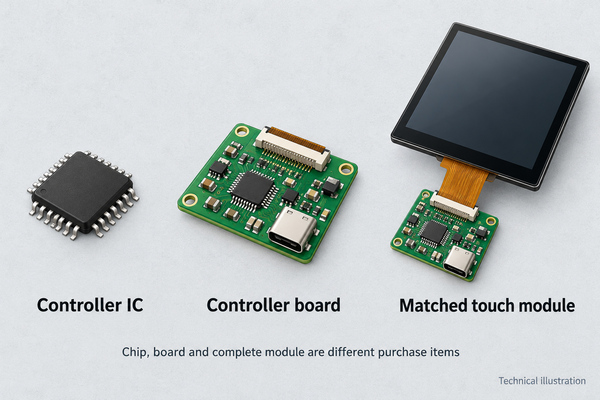
A bare IC price excludes connectors, passives, PCB assembly and development time. A board may include those items, but its firmware may be configured for a specific sensor. A matched module can simplify procurement by supplying an already paired sensor and controller, provided the required glass, interface and environmental behavior are included in the specification.
For a replacement, obtain the full panel and controller part numbers plus connector documentation. Matching only connector pitch, screen size or the word “capacitive” is not enough.
Which Interface Does a Touch Controller Use?
Common host connections include I2C, SPI and USB, with availability determined by the specific device or board. These carry touch data, not necessarily the video signal for the display.
| Interface | Typical integration task | Check before connecting |
|---|---|---|
| I2C | Connect an embedded host to the controller’s registers or report protocol | Address, pull-ups, logic levels, reset/interrupt lines and driver |
| SPI | Implement the controller’s serial protocol and timing | Chip select, mode, clock limits and report format |
| USB | Connect a controller board to a host USB port | HID support, operating-system compatibility and any required vendor utility |
An HDMI display connection does not automatically carry touch data. A display assembly may need one connection for the image and another for the touchscreen. Likewise, a USB connector does not prove that a board presents a standard HID interface; confirm its documented behavior.
Why Do Display Noise and Grounding Affect Touch Accuracy?
The controller must detect a small touch-related change in the presence of other electrical activity. Display switching, chargers and nearby circuits can couple interference into the sensor or its flex cable. Symptoms can include coordinate jitter, missed touches or contacts reported when no finger is present.
Keep sensitive sensor routing separated from noisy power and switching paths, follow the controller’s grounding and shielding guidance, and evaluate the actual display operating modes. Changes to a metal bezel or chassis connection can change the electrical environment seen by the sensor.
Do not treat increased sensitivity as the universal fix. It may recover weak touches while also accepting more interference. Compare raw or diagnostic sensor data where available, then distinguish a noise problem from a connector fault, an incorrect channel map or a firmware configuration issue.
Can a Capacitive Touch Screen Work with Gloves or Water?
It can, when the sensor, controller and settings support the required conditions. Glove operation and water rejection are separate capabilities: detecting a weaker gloved touch is not the same as rejecting conductive droplets.
Glove material, thickness and fit influence coupling. Test the actual gloves used by operators rather than treating “glove compatible” as a universal specification. The cover lens and sensor must be included in that evaluation.
Water can resemble a touch signal or disturb measurements. A controller may reject droplets, retain limited operation or temporarily suppress touch under heavier contamination. Required behavior should distinguish water rejection, wet-finger tracking and operation during cleaning. None of those features by itself establishes an enclosure’s ingress-protection rating.
What Affects Capacitive Touch Screen Controller Price?
Capacitive touch screen controller price depends on what is being purchased: the IC, an assembled board, or a paired touch module. Compare the same supply scope and order quantity before comparing unit cost.
Electrode-channel capacity, supported touch features, interface hardware, firmware customization and development support can change total cost. A low-priced unconfigured board may require more engineering effort than a compatible module.
Check part availability and lifecycle status before freezing a design. Include replacement configuration files, software support and validation effort in the purchasing decision. A marketplace unit price may exclude configuration, accessories and production support.
How Do You Test a Touchscreen Controller in the Final Assembly?
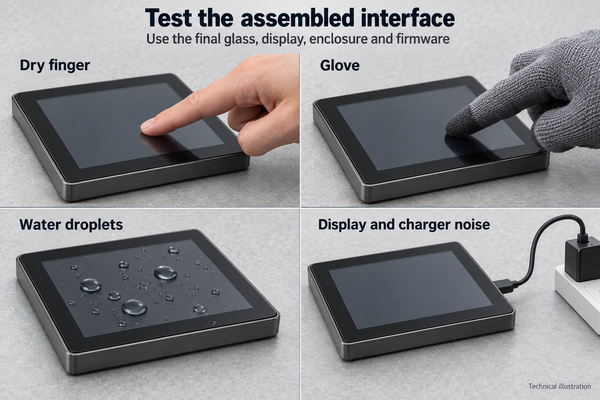
Test the capacitive touch screen controller with the production-intent sensor, glass, adhesive, display, enclosure and firmware. Record their revisions so a passing result remains tied to a reproducible assembly.
- Check power rails, connector orientation, reset behavior and host communication before changing sensitivity.
- Test single touches at the center, edges and corners. Verify that displayed coordinates follow the finger in the correct direction.
- Draw continuous paths and test the required number of simultaneous contacts. Look for breaks, jumps and false additional points.
- Repeat with relevant display patterns, brightness settings and power supplies. Compare charging and battery operation where applicable.
- Evaluate the specified gloves and wet conditions, then verify recovery after the condition is removed.
- Exercise power-up, sleep, wake and cable reconnection. Confirm that the application handles an unavailable touch device appropriately.
Define acceptance limits from the product’s interface requirements rather than borrowing a generic accuracy or latency number. Record missed touches, false contacts and recovery behavior separately; a screen that reports coordinates is not necessarily usable in every required operating condition.
Can Physical Buttons Work Alongside a Touchscreen?
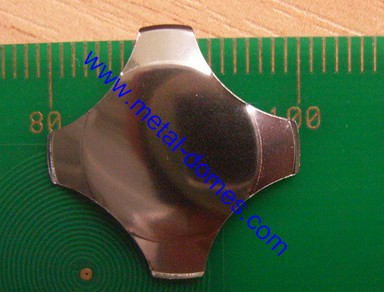
Yes. A touchscreen can handle changing menus while separate physical keys provide tactile confirmation for selected actions. The two inputs have different electrical paths: a metal dome closes contacts, whereas a capacitive sensor measures a field change.
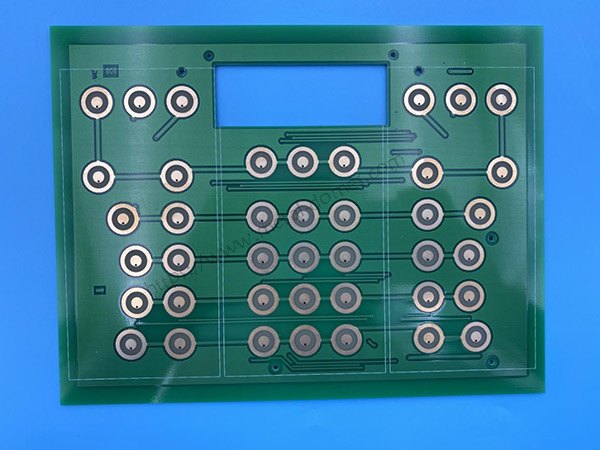
At EBest Circuit(Best Technology), we manufacture custom dome arrays for physical key layouts. Dome sizes, positions and actuation forces can be selected within a custom array, with carrier cutouts matched to the assembly. These arrays belong to the physical-button portion of the interface; they do not replace the touchscreen controller.
For that part of your design, send the key layout, overall dimensions, dome locations, required force and estimated quantity to sales@metal-domes.com. A physical key is not automatically a safety-rated stop function; any safety function requires an appropriate system architecture and validation.
Capacitive Touch Screen Controller FAQs
Can a controller app add capacitive touch to an ordinary display?
No. A capacitive touch screen controller app or utility can configure supported hardware or display its touch reports, but software alone cannot add the missing sensing electrodes and acquisition electronics.
Can a resistive touchscreen controller operate a capacitive panel?
Not unless the device explicitly supports both technologies and the required connections. Resistive sensing uses a different electrical measurement method; a similar-looking connector does not establish compatibility.
Is a higher touch report rate always better?
No. Responsiveness also depends on filtering, host processing and the application. Select a report rate that meets the task while retaining reliable detection and acceptable power consumption.